Azure AD Sync Cycle
You must ensure that required prerequisites are set to perform the Azure AD sync with the Qualys Administration application. You can further perform the required configurations for the sync operation.
Prerequisites for Azure AD
- You must be subscribed to the new Administration application.
-
Users with Administrator rights must have Manage User Group and Access User Group permissions to access and manage user groups.
-
Users must have appropriate Connector permissions to access and manage Connectors.
-
A valid email address for each user is required in Active Directory (AD).
-
One Azure AD group can be mapped to only one Qualys Administration group.
-
Certain role transitions are not supported. For example, transitioning from Manager to Remediation User is not allowed if the user group is already mapped to an Azure AD group.
-
The same unique user identifier (Object ID) must be used consistently across both SAML-based SSO integration and Azure AD synchronization, even if the SSO integration uses a different IdP. This ensures the platform can reliably identify and map the same user.
Azure AD Sync Workflow
The following image illustrates the steps involved in the Azure AD sync cycle:
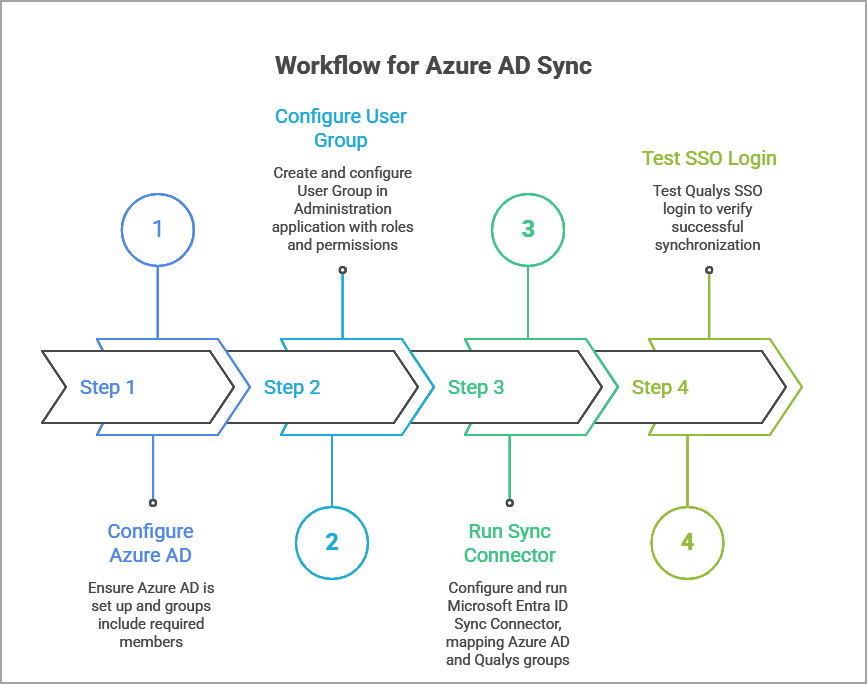
Quick Steps
Configure Azure Active Directory
Configure the Qualys Administration application